

Movers can lose after-hours and weekend leads simply because another company responds first. Research on lead response has consistently shown that faster follow-up significantly improves the likelihood of reaching and qualifying a prospect. Automated texts and emails, self-service quote requests, and follow-up sequences allow moving companies to respond 24/7 without keeping staff on shift.
A moving inquiry that comes in at 8 PM on a Saturday can be just as valuable as one that arrives Tuesday at 10 AM — but only if your company responds quickly enough. Most moving companies staff their phones and inboxes during regular business hours, which means after-hours moving leads can sit untouched overnight or through an entire weekend. By the time someone follows up, the customer may already be speaking with another mover.
The solution does not have to be a night shift. With the right automation, your company can acknowledge new inquiries, collect important move details, and keep leads engaged until your sales team is available.
When after-hours leads arrive and what happens without automation
| Time window | What the lead does | Without automation | With an automated response |
|---|---|---|---|
| Weekday evenings (5–9 PM) |
|
||
| Weekends (Sat–Sun) |
|
||
| Holidays |
|
||
| Peak-season overflow |
|
Why after-hours and weekend leads slip away
Moving customers often contact several companies within a short period of time. That makes response speed especially important. The first company to reply has an opportunity to establish availability, explain pricing, answer questions, and move the customer toward a quote before competitors enter the conversation.
The data illustrates how quickly opportunities can be lost. A Harvard Business Review study that examined roughly 2,241 U.S. companies found that the average response time to an online lead was 42 hours. Only 37% responded within an hour, while 23% never responded at all. Companies that contacted leads within an hour were nearly seven times more likely to have a meaningful conversation with a decision-maker.
Now consider what happens outside normal office hours. A lead arriving Friday at 7 PM may wait until Monday morning for a callback. Instead of being an hour late, the response may come more than two days later.
That gives the customer plenty of time to request other quotes, compare availability, and potentially book elsewhere. It is also why the five-minute rule matters for moving companies that depend heavily on inbound leads.

How much business are you really losing after hours?
Many moving companies do not know how many opportunities they lose after hours because they only measure completed calls, booked estimates, and closed jobs. The unanswered form submission or missed call that eventually books with another mover rarely appears in the sales report.
Start by reviewing when your inquiries actually arrive.
Look at timestamps from website forms, missed calls, quote requests, paid advertising leads, and other inbound channels. Weekday evenings, weekends, holidays, and peak-season call overflow are often the periods when customer demand continues even though staffed response slows down.
If a meaningful percentage of inquiries arrive during those windows and customers regularly wait until the next business day for a reply, the issue is not simply an occasional missed lead. It is a gap in the sales process that repeats every week.
How do you capture after-hours moving leads when the office is closed?
You do not necessarily need overnight staff or a fully automated AI receptionist. In many cases, the most important step is simply making sure your CRM delivers the first response immediately and gives the customer a clear next action.
- Send an instant reply to every new lead. When a call is missed or a form is submitted, an automated text or email can confirm that the request was received and explain what happens next. The customer immediately knows that their inquiry reached your company.
- Offer self-service quote requests. A structured intake link allows customers to provide their move date, addresses, inventory, home size, and other important details on their own time. Your team starts the next business day with useful information instead of only a phone number.
- Build automated follow-up sequences. Pre-built automated reminders can keep the conversation active throughout the weekend. They can also help re-engage quiet leads that do not respond to the first message.
- Use an SMS chatbot for common questions. An SMS chatbot can handle straightforward questions about availability, service areas, scheduling, and the information needed for an estimate without requiring a salesperson to be online.
- Create a clear morning handoff. Every inquiry collected overnight should appear in one prioritized queue with the customer’s available information and communication history. This is one of the biggest benefits when you automate your communications across the sales process.
The purpose of automation is not to complete the entire sale without a person. It is to prevent silence during the hours when your team is unavailable.
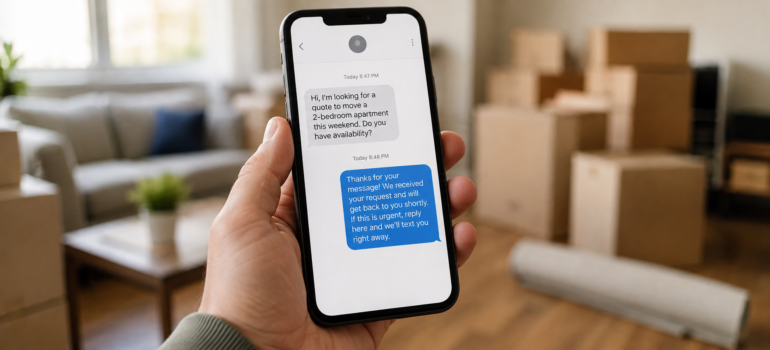
Setting up an after-hours system in your CRM
A useful after-hours workflow can start with three basic decisions: what triggers the automation, what message the customer receives, and when the conversation is handed to a salesperson.
Triggers might include a missed call, a new website form, a quote request, a Facebook lead, or another inbound inquiry. The first automated response should arrive within seconds and confirm that the company received the request.
From there, build a simple follow-up sequence covering the next 24 to 48 hours. Depending on the lead source, that sequence might ask for missing move information, provide a quote-request link, answer common questions, or remind the customer that your team will follow up.
Finally, send all after-hours inquiries into one CRM queue so the sales team can work through them as soon as the office opens.
The goal is not to automate the relationship. It is to remove the delay between the customer’s inquiry and your company’s first response. That is also where a CRM designed for responding to leads faster can make a measurable difference.

Stop losing moves after 5 PM
After-hours moving leads are not necessarily lower-quality inquiries. They are often customers researching their move when they finally have time — after work, during the weekend, or on a holiday.
The problem is what happens after they contact you.
With automated first responses, self-service quote requests, and follow-up that continues outside business hours, MoversTech helps moving companies stay responsive even when the office is closed. Your team can return in the morning to organized, engaged leads instead of unanswered inquiries that have already gone cold.
To see how MoversTech can help capture and manage after-hours and weekend moving leads in one system, book a demo with our team.
Frequently Asked Questions
How fast should a moving company respond to a lead?

Ideally, within the first few minutes. Research on lead response has found that the likelihood of reaching and qualifying a prospect drops quickly as response time increases. For movers, fast follow-up matters even more because customers frequently contact several companies while comparing quotes and availability.
Can automated texts and forms capture a move when no one's in the office?
They can capture and qualify much of the initial inquiry. An automated text or email can acknowledge the lead, while a self-service quote form collects details such as the move date, addresses, inventory, and home size. Your sales team can then continue the conversation when the office opens.
What percentage of moving leads come in after business hours?
There is no single percentage that applies to every moving company. It depends on the market, season, advertising channels, and customer behavior. The best approach is to review timestamps from your own calls and form submissions over several weeks and determine how much demand arrives during evenings, weekends, and holidays.
Do customers mind getting an automated reply after hours?
A clear automated acknowledgment is generally more useful than leaving the customer without any response. Keep the message short, identify your company, confirm that the inquiry was received, and explain what the customer can do next or when a team member will follow up.
Will automating after-hours responses replace my sales team?
No. Automation is most effective when it handles the repetitive first steps: acknowledging the inquiry, collecting basic information, sending reminders, and keeping the lead engaged. Your sales team still handles detailed estimates, questions, relationship-building, and closing the move.
